



Small businesses are now big targets for hackers. Big companies typically have the financial resources and personnel to fight back, but small and medium-sized businesses (SMBs) often lack these resources. This vulnerability leaves them susceptible to data theft, financial loss, and damage to their reputation. A single cyberattack can cost a small business a considerable amount of money, which can be very hard to recover from.
If you operate a small business, work in IT, or even own your own firm, you must learn how to stay secure online.
In this article, we’ll go over several low-cost and simple cybersecurity tips for small businesses to help you safeguard your organisation. By following these procedures, you can protect your data and ensure that your business operates effectively without incurring excessive costs. These Small Business Cybersecurity Tips are essential for protecting your firm against potential threats and ensuring its long-term security.
Understanding the SMB Cybersecurity Landscape
Cyber threats targeting small businesses are on the rise. A lack of resources, knowledge, and comprehensive security protocols makes SMBs easy prey for cybercriminals. Let’s examine the most common threats that small businesses face.
Common Threats Facing Small Businesses
-
Phishing & Social Engineering
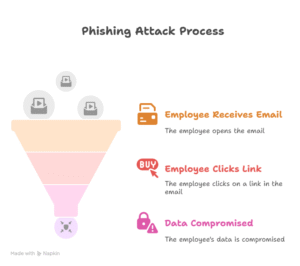
Phishing scams remain one of the most prevalent methods for cybercriminals to gain unauthorized access to sensitive data. These scams often appear as seemingly legitimate emails or text messages that deceive employees into providing personal information or clicking on malicious links.
-
Ransomware
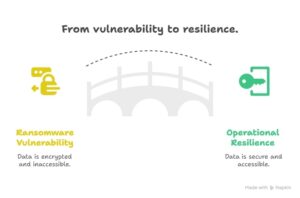
Ransomware is a type of malware that encrypts a system’s files or data and then demands a ransom for their release. Ransomware attacks target under-protected firms, encrypting critical data and demanding a ransom for its release. For many SMBs, paying the ransom becomes the only option to restore operations.
-
IoT and Cloud Misconfigurations
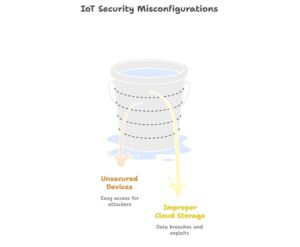
Misconfigurations in these systems pose an additional security concern as Internet of Things (IoT) devices and cloud-based services become more prevalent. Unsecured devices or improperly configured cloud storage systems can provide a straightforward entry point for attackers.
Real-World Impact
A data breach can be extremely costly to a small organisation. For example, a local store was attacked by a type of malware that hit its payment system. This resulted in the theft of thousands of customers’ card details. The store not only lost money but also lost the trust of many customers, which hurt its reputation.
10 Small Business Cybersecurity Tips
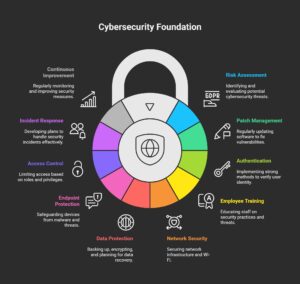
Tip 1 – Conduct a Comprehensive Cybersecurity Risk Assessment
One of the first steps in safeguarding your business is to understand what you’re up against. A cybersecurity risk assessment identifies potential vulnerabilities in your business’s systems and helps prioritise areas of concern.
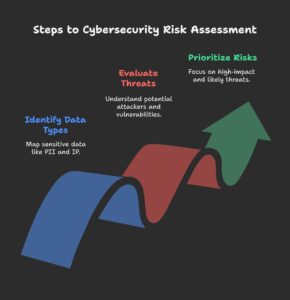
Identify Critical Assets & Data Flows
- Map Data Types: Identify sensitive data such as personal identifiable information (PII), financial records, and intellectual property (IP).
- Evaluate Threat Actors & Vulnerabilities: Understand who might target your business (hackers, disgruntled employees) and how they could exploit vulnerabilities.
- Prioritise by Impact & Likelihood: Focus on risks that could have the highest impact on your business and the likelihood of those threats occurring.
A detailed cybersecurity risk analysis allows you to deploy resources and address the most significant issues first efficiently.
Tip 2 – Maintain Regular Patch Management & Software Updates
Hackers often attack software that isn’t updated. Updating your software and firmware regularly helps fix known weaknesses before hackers can exploit them.
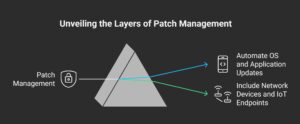
Why Patch Management Matters for SMBs
- Automate OS and Application Updates: Enabling automatic updates for your system and apps ensures you always receive essential fixes on time.
- Include Network Devices and IoT Endpoints: Don’t overlook the devices connected to your network. Constantly update routers, IoT devices, and security appliances.
By implementing a proactive software patching strategy, you can dramatically reduce the risk of cyberattacks targeting outdated systems.
Tip 3 – Implement Strong Authentication with MFA & Password Managers
Hackers still find it very easy to break into systems that use weak passwords. Implementing multi-factor authentication (MFA) and using password managers are essential steps in protecting your business.
Enforce Unique, Complex Passwords
Ask employees to use strong, complex passwords that are difficult to guess and crack. This makes it much harder for attackers to break into your systems with brute force attacks.
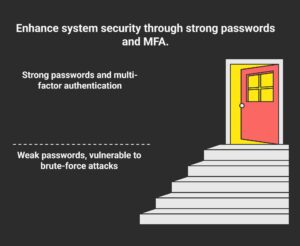
Roll Out Multi-Factor Authentication
- Best Practices: Utilise app-based MFA or hardware tokens for an additional layer of security.
- Password Manager Benefits: Password managers securely store and encrypt passwords, making it easier for employees to manage complex login credentials without compromising security.
Tip 4 – Employee Security Awareness & Phishing Simulations
Your employees are your first line of defence. Equip them with the knowledge and tools they need to spot and avoid phishing scams.
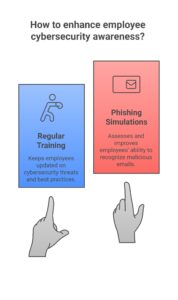
Build a Security-First Culture
- Regular Training: Schedule ongoing training sessions to keep employees informed about the latest cybersecurity threats and best practices.
- Phishing Simulations: Simulate phishing attacks to assess employees’ ability to recognise malicious emails and links. Measure click rates and provide follow-up coaching to improve their awareness.
Tip 5 – Secure Network Architecture & Wi-Fi Configuration
Your network is the backbone of your business operations. Securing your network and properly configuring Wi-Fi settings can prevent unauthorised access.
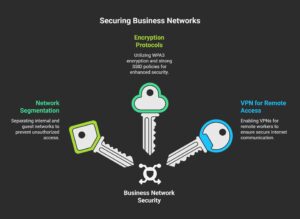
Segment Internal vs. Guest Networks
- Separate Networks: Keep your internal network separate from guest Wi-Fi to prevent unauthorised access.
- WPA3 Encryption & Strong SSID Policies: Utilise WPA3 encryption for enhanced security and refrain from using default SSID names for your network.
- VPN for Remote Workers: Enable a VPN (Virtual Private Network) for remote employees to ensure secure internet communication.
Network segmentation and proper encryption protocols are crucial for ensuring that only authorised users can access sensitive business data.
Tip 6 – Data Backup, Encryption & Recovery Planning
Data loss can occur for several reasons, including human error and ransomware attacks. Having a comprehensive backup, encryption, and recovery plan in place is vital to minimising the impact of such incidents.
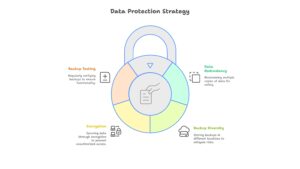
3-2-1 Backup Strategy Explained
Backing up your data isn’t just a tech best practice—it’s your safety net against loss, breaches, and disasters. The 3-2-1 backup strategy provides a reliable and straightforward framework to keep your information secure and recoverable, regardless of what happens.
- 3 Copies of Data: Always keep three copies of your data – one main copy that you use daily and two backups for safety.
- Offline vs. Cloud Backup: Store one backup offline (like an external hard drive) and another in the cloud. This way, if one fails or is attacked, you still have another safe copy.
- Encrypt Data at Rest and in Transit: Secure your data by encrypting it both when stored and during transfer. This helps prevent unauthorized users and hackers from accessing your information.
- Test Your Backups: Regularly test your backups to ensure they are functioning correctly. A backup is only helpful if you can actually restore it when needed.
A well-implemented backup and encryption strategy ensures that your data is recoverable even in the event of a breach.
Tip 7 – Endpoint & Anti-Malware Protection Strategy
Malware primarily targets endpoints, including computers, cellphones, and tablets. Deploying robust antivirus and endpoint detection and response (EDR) solutions is crucial for protecting your business from malicious software.
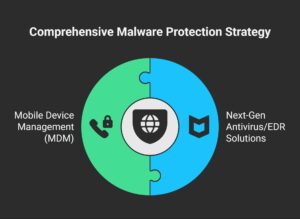
Deploy Next-Gen Antivirus/EDR Solutions
Utilise next-generation antivirus tools and EDR solutions that offer real-time scanning and heuristic analysis to detect malware before it can cause damage.
Mobile Device Management (MDM)
If employees use mobile devices for work, set up a Mobile Device Management (MDM) tool to apply security rules and protect the devices.
Tip 8 – Least Privilege Access & Role-Based Controls
One of the most effective ways to mitigate potential damage from insider threats is by implementing the principle of least privilege (PoLP).
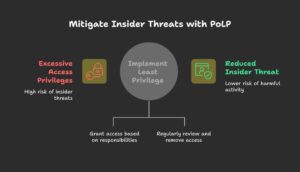
Define Roles, Groups, and Permission Sets
Grant employees access only to the systems and data they require for their job responsibilities. This lowers the risk of mistakes or harmful activity.
Periodic Access Reviews
Review access permissions regularly to ensure employees only use the resources they need. Take away access for anyone who no longer needs it.
Tip 9 – Develop a Robust Incident Response Plan
Even strong security can’t guarantee complete safety from breaches. A clear incident response plan enables your business to react quickly and handle situations effectively.
Key Incident Response Phases
- Prepare: Create a step-by-step plan, known as a playbook, that outlines the actions to take in the event of an attack. Train your team so they know precisely how to respond.
- Detect: Set up monitoring tools to watch for unusual activity. This helps you spot threats early before they cause too much damage.
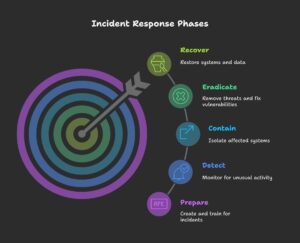
- Contain: If an attack occurs, separate the affected systems immediately. This stops the problem from spreading to other parts of your business.
- Eradicate: Completely remove the threat from your systems. Fix any weak spots that the hackers used so they can’t get back in.
- Recover: Restore your systems and data to their normal state. Test everything to ensure it’s safe before resuming regular business.
Incident response drills should be conducted regularly to ensure everyone knows their role in the event of a breach.
Tip 10 – Monitor, Audit & Continuous Improvement
Cybersecurity is a constantly evolving field. Regularly monitoring and auditing your systems will help you identify new vulnerabilities and continuously improve your security posture.
Implement SIEM Lite
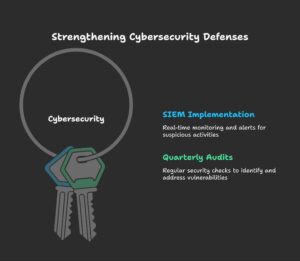
SIEM systems collect and organise logs from every device and application you use, providing Security Information and Event Management. They provide real-time alerts to help detect and respond to suspicious activity.
Quarterly Security Audits and Pen Testing
Conduct security audits and penetration testing quarterly to identify any weaknesses in your defences before cybercriminals do.
FAQ
1. Why is cybersecurity important for small businesses?
Small businesses are the most common targets for hackers due to their limited resources and insufficient protection. Cyberattacks can result in data breaches, financial losses, and reputational damage. Effective cybersecurity policies protect data and ensure business continuity.
2. What are the most common cyber threats small businesses face?
Small businesses commonly face threats such as phishing attacks, ransomware, malware, and social engineering scams. These assaults frequently target vulnerabilities such as weak passwords, out-of-date software, and a lack of employee understanding.
3. What is multi-factor authentication (MFA) and why is it necessary?
MFA requires users to give two or more verification factors in order to access a system. This makes it more difficult for unauthorized individuals to access sensitive data. It’s a critical step in securing accounts and protecting against unauthorized access.
4. How often should I update my software and systems?
Regular updates are essential to protect against known vulnerabilities. Set up automatic updates where possible, and manually check for updates for software that doesn’t support this feature. Regular patching helps prevent exploits of known security flaws.
Conclusion
In today’s connected world, cybersecurity is crucial for maintaining the safety and trustworthiness of your business. Whether you’re working alone or leading a team, these 10 tips give you an easy way to protect your data, customers, and reputation.
You don’t need a huge budget or an entire IT team to stay secure. Start with the basics: enable multi-factor authentication and keep your software up to date.
Next, ensure that your employees can identify potential dangers. Backups, access controls, and an incident response strategy can all help to strengthen security measures. These measures will safeguard your business.