



Did you know that a ransomware attack happens every 11 seconds? Ransomware attacks have caused serious problems for many businesses recently. It poses a significant danger to organizations of all sizes, locking data, stealing important information, and damaging reputations. It can lock your files, steal important data, and hurt your company’s reputation.
This guide will walk you through basic ways to safeguard your business from ransomware. By acting early and being prepared, you can stop attacks before they happen. We’ll share tips and tools to help you keep your data safe and your business running smoothly.
Understanding Ransomware
What is Ransomware?
Ransomware is a type of malicious software that locks your files or devices and demands payment to regain access to them. It works by encrypting your data, making it unreadable, and then demanding a ransom to return access to your files.
Types of Ransomware
Crypto Ransomware: This type of ransomware encrypts your files, rendering them unreadable. To obtain a decryption key, which is necessary to unlock the files, the attacker requests payment. Although you may still be able to use your computer, your critical files (such as photos, documents, and videos) are locked and cannot be accessed without paying the ransom.
Locker Ransomware: Unlike crypto ransomware, locker ransomware completely locks you out of your device. It takes over your screen and stops you from using your computer, tablet, or smartphone until you pay the ransom. Until the attacker is paid, your device stays locked, and you are unable to access any of your files or apps. Typically, cryptocurrency is used for transactions to maintain anonymity. Once the payment is made, the attacker may or may not release the lock, leaving you vulnerable to further exploitation.
Double Extortion: This is a more hazardous version of ransomware. In addition to locking your files, the hacker also steals essential data, such as personal information, company secrets, or financial records. Subsequently, they demand payment to unlock the files and prevent the stolen data from being shared or sold. Even if you pay to recover your files, however, your data may still be vulnerable to exposure. Therefore, the risk remains even after the transaction is completed, as the stolen information could be used against you.
RaaS (Ransomware-as-a-Service): This model essentially enables criminals with limited technical skills to carry out ransomware attacks. In other words, instead of creating their own ransomware, hackers can rent or buy ransomware tools from other cybercriminals who make and maintain them. As a result, this makes it easier for more people to launch ransomware attacks, even if they don’t know how to create the harmful software themselves. Therefore, the accessibility of such tools is increasing the number of potential attackers.
How Ransomware Spreads
Phishing Emails: These are fake emails that appear to be from trusted companies or individuals. They trick you into clicking on dangerous links or opening attachments that install ransomware on your computer. Once you click, the hacker can steal your data or lock your files.
Exploiting Unpatched Vulnerabilities: When your software (like apps or the operating system on your computer) isn’t updated, it can have weaknesses. Hackers know these weaknesses and use them to sneak into your system. That’s why it’s so important to keep all your software up to date with the latest security patches.
Insecure Connections: If you connect to your computer from a different location and the connection is insecure, cybercriminals may take advantage of it. They can use this weakness to spread ransomware. Weak security settings make it easy for them to get in. To protect yourself, use strong passwords and extra security tools like VPNs (Virtual Private Networks). These measures help keep your connection safe.
The Real-World Impact of Ransomware
Financial Losses
Direct Costs:
These are the immediate, obvious costs after a ransomware attack.
- Ransom Payments: Hackers often demand money (ransom) to unlock your files. Even if you pay, there’s no guarantee you’ll get your files back.
- Downtime: When your systems are locked, your business can’t operate. This causes delays and stops you from earning money.
- Recovery: Fixing everything after an attack is costly. You might need to pay for IT experts, new software, and hardware to get everything back to normal.
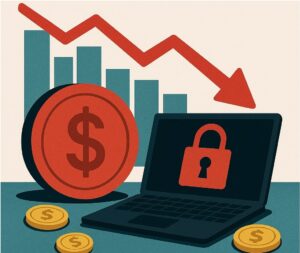
Indirect Costs:
These are hidden costs that may appear later.
- Reputational Damage: If people find out your company was attacked, they might lose trust in you. This can hurt your brand’s image and make it harder to attract customers.
- Customer Churn: If customers feel unsafe, they may stop doing business with you and go to your competitors.
- Loss of Competitive Advantage: While you’re dealing with a ransomware attack, your competitors could take advantage of the situation. This makes it harder for you to stay ahead in the market.
Customer Trust Issues:
- Rebuilding Brand Reputation After an Attack:
Once a ransomware attack occurs, your customers may be concerned about the security of their data. Rebuilding trust can be an expensive and time-consuming endeavor. You’ll need to prove that you are taking extra steps to protect their information.
- The Long-Term Damage to Customer Relationships:
Even if you fix everything, some customers might decide to leave for good. The attack can hurt the relationship you’ve built with them, and it may take years to restore their trust. This long-term damage can affect your company’s future.
Common Entry Points & Attack Vectors
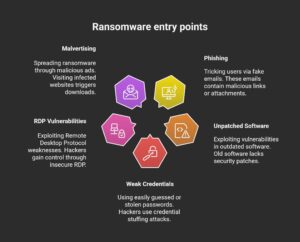
Ransomware can enter your system through various methods. Hackers employ various methods to infiltrate your computer or network. Here are some of the most common ways ransomware spreads.
Phishing & Scams
Phishing and Social Engineering Explained:
These types of emails often appear to come from trusted companies or friends. By clicking their links or attachments, you might unknowingly allow hackers to install malware on your computer or steal your personal information. As a result, it’s crucial to remain cautious and verify the sender before taking any action.
Spear-Phishing:
This is a more targeted type of phishing attack. The hacker researches the person they are trying to trick, making the email seem even more real. It could look like an email from a boss, coworker, or someone you know.
Social Engineering:
Social engineering is a technique where hackers use tricks to manipulate people into giving them sensitive information or access. For example, a hacker might pretend to be someone from your IT department and ask you to download a file or provide your password.
Exploiting Unpatched Software Vulnerabilities
Outdated Software:
Software that isn’t updated regularly can have weaknesses, called vulnerabilities, that hackers can use to gain access to your system. When software is outdated or has not been patched, it becomes easier for ransomware to slip in.
Examples of Exploits:
There have been several notable attacks caused by these weaknesses, such as the WannaCry attack in 2017. It spread through outdated Windows systems that weren’t updated with the latest security patches.
Weak or Fake Certificates
Weak Passwords:
Using weak passwords like “123456” is like leaving your front door wide open—hackers can break in within seconds. A strong password works like a sturdy lock, keeping your accounts safe from intruders.
Credential Stuffing Attacks:
This happens when hackers use stolen usernames and passwords from one website to try and break into accounts on other sites. People often reuse passwords, making it easier for hackers to access more than one account.
Remote Desktop Protocol Vulnerabilities
RDP Risks:
RDP (Remote Desktop Protocol) connects you to access your computer from a different place. If it’s not set up properly or has weak security, hackers can easily break into your system through RDP and take control.
Lateral Movement:
Once hackers break into a system through RDP, they can move across the network, accessing other computers and systems, and spread ransomware more easily.
Malvertising and Drive-By Downloads
Malicious Ads:
Malvertising refers to fake ads on websites that contain harmful code. When you click on these ads, ransomware can be secretly downloaded onto your computer.
Drive-By Downloads:
These happen when you visit a website that has been infected with malicious code. You don’t have to click anything; just visiting the website is enough to start the download of ransomware onto your computer.
How to Prevent Ransomware Attacks
Keep Your Software Up to Date
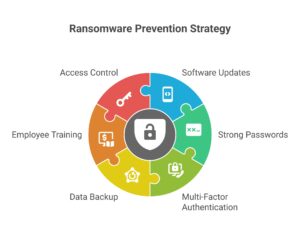
It’s essential to always keep your computer and software up to date. Updates close security gaps that hackers could use to get access to your system. If you don’t update, your system becomes an easy target for attacks, such as ransomware.
Use Strong Passwords and MFA
Strong Passwords:
Ensure your passwords are complex enough to be challenging to guess. Create something unique by combining numbers, letters, and symbols.
Multi-Factor Authentication (MFA):
MFA adds an extra layer of security. Even if a hacker figures out your password, they still can’t get in without your second step of security—like a code sent to your phone. This extra step is called two-factor authentication (2FA), and it keeps your accounts much safer.
Back Up Your Data
Back up your important files regularly, so if ransomware locks them, you can restore them from your backup. The 3-2-1 Backup Rule says: keep 3 copies of your files, store them on 2 different types of devices, and 1 should be kept offsite or in the cloud.
Train Employees About Phishing
Teach everyone in your team how to spot fake emails or suspicious links. Phishing emails encourage recipients to click on harmful links that install ransomware. With proper training, your team can avoid falling for these tricks.
Limit Access to Sensitive Data
Not everyone needs access to all the information in your company. Only give people access to the data they really need for their job. This limits the damage if ransomware ever does get through.
Advanced Defense Measures
Threat Intelligence Integration
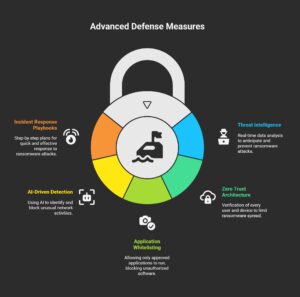
Threat intelligence utilizes real-time data to track emerging ransomware threats, enabling businesses to stay ahead and adjust their defenses to block attacks before they occur.
Zero Trust Architecture
Zero Trust never grants automatic trust. It requires verifying every user and device, which helps contain ransomware if one system becomes infected.
Application Whitelisting
Application allowlisting allows only approved programs to operate on your system, limiting ransomware attacks by prohibiting untrusted apps.
AI-Driven Anomaly Detection
AI helps identify unusual activity on your network, such as suspicious file changes. It can block ransomware by identifying and stopping suspicious actions in real time.
Incident Response Playbooks
Incident response playbooks are step-by-step plans for dealing with ransomware attacks. They help teams act quickly to minimize damage and restore normal operations.
What You Should Do Right Away After a Ransomware Attack
Immediate Containment
If your system gets infected with ransomware, the first thing you should do is isolate the affected devices to stop the infection from spreading. To prevent malware from spreading, disconnect the afflicted devices from the network so that they cannot infect other machines. Unplug all external devices and backup disks to prevent the infection from spreading to them.
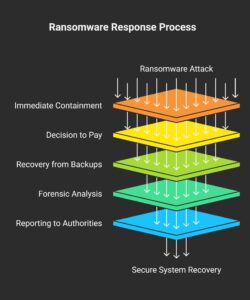
The Decision to Pay
When faced with ransomware, you’ll have to decide if you want to pay the ransom. Ethically, paying encourages more attacks. Practically, paying doesn’t guarantee you’ll get your data back or that you’ll be safe in the future. Hackers may come back for more money.
Recovery from Backups
If you have clean, offline backups, now is the time to use them to restore your files and systems. After restoration, analyze the system thoroughly to ensure you eliminate the ransomware and remove any hidden dangers.
Forensic Analysis and Reporting
Cybersecurity experts determine how the ransomware attack occurred and identify the exploited weaknesses. You’ll also need to report the attack to the authorities and follow any applicable legal procedures to ensure the proper handling of the situation and prevent future issues.
Future Trends in Ransomware
Double and Triple Extortion
Previously, ransomware attacks would lock data until a ransom was paid. Now, attackers are using double extortion, where they not only lock your files but also steal and threaten to release your sensitive data to the public. In triple extortion, they may demand money from both the business and its customers or partners, making the attack even more damaging.
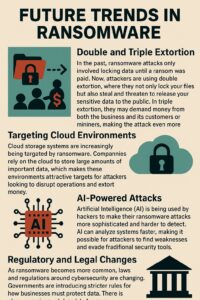
Targeting Cloud Environments
In the past, ransomware attacks locked data until victims paid a ransom. Now, attackers are using double extortion, where they not only lock your files but also steal and threaten to release your sensitive data to the public. In triple extortion, they may demand money from both the business and its customers or partners, making the attack even more damaging.
AI-Powered Attacks
Hackers use artificial intelligence (AI) to make ransomware attacks smarter and harder to stop. AI helps them quickly find weaknesses in systems, making it easier for them to avoid security measures. This means ransomware attacks could become more dangerous and harder to detect in the future.
Regulatory and Legal Changes
As ransomware attacks become more common, laws and rules about cybersecurity are changing. Governments are creating stricter guidelines to help businesses protect their data. There is also a growing effort for countries to work together to stop ransomware and punish those responsible for the attacks.
Conclusion
In conclusion, keeping your organization safe from ransomware requires a strong defense plan. By using good technology, training your employees, and backing up your data regularly, you can lower the chances of an attack. It’s important to take action right away—start by updating your software, improving network security, and creating an incident response plan. After that, use a cybersecurity checklist to evaluate your current security posture, and consider hiring cybersecurity professionals for additional protection.



[…] malware that encrypts a system’s files or data and then demands a ransom for their release. Ransomware attacks target under-protected firms, encrypting critical data and demanding a ransom for its […]
[…] Ransomware encrypts your data and demands money to unlock it. One moment you have access, the next everything is frozen. It’s a serious threat to individuals and businesses alike, and paying the ransom doesn’t guarantee that you’ll recover your data. […]