



Starting your first online store can feel exciting and confusing at the same time. I’ve helped many new sellers get started, and here’s what I’ve learned—choosing the right e-commerce platform makes everything easier. You don’t need something fancy. You need something simple, flexible, and easy to grow with. In this guide, I’ll share six solid platforms that are great for beginners. No fluff, no hype—just tools that work.
Platform #1: Shopify – A Simple, All-in-One Store Builder for Beginners
Why It’s Great for New Sellers
Shopify makes launching an online store easy. No tech skills needed—just add your products and start selling. It handles hosting, security, and updates for you.
Key Features
Use the drag-and-drop builder to design your store. Built-in AI helps with product descriptions. You can also add apps for marketing, shipping, and more.
Pricing and Free Trial
The basic plan starts around $29/month. There’s also a lower-cost option for social selling. Free trials are often available so you can test it first.
Pros and Cons for New Business Owners
Pros:
-
Super easy to set up
-
Mobile-friendly and fast
-
Lots of design options and apps
-
Great for selling on social media and in person
-
Reliable customer support
Cons:
-
Monthly fees can add up over time
-
Extra costs for some features and apps
-
Some tools only unlock with higher plans
-
Design customization can be limited without coding
Platform #2: Wix – A Design‑Focused E‑Commerce Builder with Built‑In Marketing Tools
How Wix blends website design and online selling
Wix makes it easy to build a beautiful online store with zero coding. You start with a template, then drag and drop to customize. You can add products, set up shipping, and accept payments—all from one place. Everything feels simple, even if you’ve never built a website before.
SEO tools, mobile templates, social media integration
Wix gives you tools to help people find your store. It guides you through SEO basics and sets up your site for mobile. You can also connect your store to social media, run email campaigns, and even chat live with customers—all without leaving your dashboard.
Pricing tiers and free‑trial options
Wix has a free plan, but you’ll need a paid one to sell products. Plans start around $29 a month. You get more tools as you move up in tiers. A 14-day trial lets you test things out before you commit.
Ideal user profile and limitations
Wix is great for creatives, small shops, and first-time sellers. It’s easy to use and looks good. But it’s not built for massive stores or complex systems. If you plan to scale fast or need deep custom features, you may outgrow it.
Platform #3: WooCommerce (via Bluehost) – Flexible WordPress-Powered E-Commerce
Why WooCommerce is Great for WordPress Users
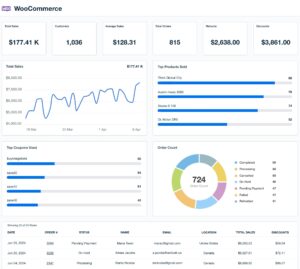
If you already use WordPress, WooCommerce fits right in. It turns your site into an online store without changing how you work. You can sell physical or digital products, manage orders, and handle payments all in one place.
Setup Steps and Hosting Costs with Bluehost
Bluehost makes getting started easy with simple setup and hosting plans made for WooCommerce. Plans start affordable and include things like a free domain and security features. It’s a good choice if you want help getting online fast without technical hassle.
Core Features for Small Businesses
WooCommerce offers all the basics you need to run a small store. You can accept payments, track inventory, and set up shipping options. It’s flexible enough to grow with your business but still simple for beginners.
When WooCommerce Works—and When It Gets Complex
WooCommerce is great for new sellers who want control and flexibility on WordPress. But as your store grows, managing more products or custom features can get tricky. At that point, you might need extra help or tools to keep things running smoothly.
Platform #4: Square Online – The Free‑Plan Option That Lets You Start Selling Now
Benefits of Square Online’s forever‑free plan
Square Online offers a free plan that’s great for beginners. You can set up a simple store without paying monthly fees. It includes all the basics you need to list products and accept payments. This makes it easy to start selling without any upfront costs.
In‑person and online sales sync via Square POS
Square Online connects your website with Square’s in-person payment system. This means sales and inventory update automatically, whether you sell online or face-to-face. It keeps things organized and saves you from juggling multiple tools.
When to upgrade and what features come later
If your business grows, you can upgrade for features like a custom domain, no Square ads, and better shipping options. Higher plans also add marketing tools and customer support. Start free, then upgrade when you need more.
Best use cases and limitations for scaling
Square Online works best for small sellers or those who want to combine online and offline sales easily. It’s simple and budget-friendly. But if your store grows fast, you might need more advanced tools elsewhere later on.
Platform #5: BigCommerce Essentials – Powerful Inventory Tools for Growing Brands
BigCommerce Essentials is built for entrepreneurs who are ready to grow fast. It offers powerful tools that help manage inventory, improve customer experience, and keep everything running smoothly as your business expands.
Who Should Use BigCommerce Essentials
This platform works best for sellers who already have some traction. If you’re running a growing brand, managing lots of products, or selling across multiple channels, BigCommerce gives you the structure and features to keep scaling.
Features: Single-Page Checkout, Product Filters, Detailed Analytics
BigCommerce keeps your store fast and customer-friendly. The single-page checkout helps reduce abandoned carts. Smart product filters let shoppers find what they want quickly. The built-in analytics give you a clear view of what’s working and where to improve.
Pricing Levels for Scaling Entrepreneurs
BigCommerce offers three main plans. The Standard plan starts at $39 per month. The Plus plan, with extra tools like cart recovery, is $105 per month. The Pro plan is $399 per month and is built for high-volume sellers. Each tier unlocks more features as your business grows.
Tradeoffs for Beginners
BigCommerce is powerful, but not the easiest for first-timers. There’s a learning curve, especially if you’re new to online selling. And as your store grows, higher-tier plans can get pricey. You may also need help with customizations if you’re not tech-savvy.
Still, for entrepreneurs planning to scale, it’s a solid investment in long-term growth.
Platform #6: Ecwid by Lightspeed – Add Online Sales to Any Existing Site or Social Page
How Ecwid lets you sell via website, social media, and marketplaces
Ecwid lets you turn any website into a store. Just copy and paste a short code to get started. It also connects with Facebook, Instagram, and marketplaces like eBay. You manage all your products in one dashboard, even across different sales channels.
Free plan and upgrade options
The free plan lets you sell up to five products with no monthly cost. If you need more, paid plans offer extra features like discount codes, ad tools, and abandoned cart recovery. You can upgrade as your business grows.
Ease of embedding store and managing orders
You don’t need to rebuild your site—just add Ecwid in minutes. It’s beginner-friendly and works on blogs, site builders, or custom pages. Managing orders is easy, too. Everything shows up in one place, and you can handle shipping, inventory, and customer updates without stress.
Ideal scenarios and limitations
Ecwid works best for small sellers who already have a website or social following. It’s perfect for testing ideas or side hustles. But if you need deep customization, real-time shipping, or advanced SEO, you’ll need a higher-tier plan.
Bonus Insight #1: Headless Commerce for Future‑Minded Entrepreneurs
What “Headless Commerce” Means in Simple Terms
Headless commerce separates your store’s front end from the back end. In simple terms, your website’s look runs on its own, while your store’s engine—like products, payments, and orders—works separately. They connect through APIs. This setup gives you more control over how your store looks and works.
How It Offers Flexibility and Future‑Proofing
Because the design and backend are split, you can update one without messing up the other. Want to change your layout, add new features, or launch a mobile app? No problem. Headless setups are fast, flexible, and built to grow with you.
When Non‑Technical Founders Should Consider Headless Setups
Headless commerce isn’t ideal for everyone. If you’re just starting out with no tech help, it can be tricky and expensive. But if you plan to grow fast, have access to a developer, or want a custom shopping experience, it might be worth it down the line.
Platforms to Watch for Future Trends
Some platforms now support headless setups out of the box. Shopify Plus, BigCommerce, and Adobe Commerce are leading the way. For more flexibility, open-source tools like Spree Commerce are gaining traction among fast-growing brands.
Bonus Insight #2: Choosing E‑Commerce Payment Setup That Builds Trust
Why integrated payments matter for beginners
When you’re starting out, the last thing you want is a messy payment setup. Integrated systems keep things simple. They let you manage everything in one place—no juggling accounts or platforms. A smooth payment flow also builds trust. Customers feel more secure when checkout is quick and clear.
Payment options: Shopify Payments, Stripe, and Square
Shopify Payments works right inside your Shopify store. It supports cards, Apple Pay, and more.
Stripe is flexible and works with many platforms. It’s great for online and mobile sales.
Square is perfect if you’re selling both online and in person. It’s easy to set up and beginner-friendly.
How simpler checkout boosts conversions
A clean checkout helps more people finish their orders. Long forms and surprise steps turn buyers away. Letting guests check out, saving payment info, and using trusted methods like PayPal or Apple Pay all help. The easier it is, the more likely people will buy.
Consider transaction fees and trust signals
Every sale has a small fee—usually around 2.9% plus a few cents. Some platforms offer lower rates if you use their payment system. But it’s not just about the fee. Show clear prices, offer secure options, and display trust badges. These small things help people feel safe when buying from your store.
Quick Comparison of the Top 6 E-Commerce Platforms for New Entrepreneurs
Setup Ease | Cost to Start | Free Plan or Trial | Key Marketing Tools
Shopify, Wix, and Square Online are easy for beginners with simple setup steps. WooCommerce needs some WordPress know-how, while BigCommerce is better for those comfortable with more advanced options. Ecwid is great if you already have a website and want to add a store quickly.
Shopify and BigCommerce tend to cost more each month. WooCommerce itself is free but requires paid hosting. Ecwid and Square offer solid free plans that help new sellers get started without upfront costs.
Ecwid and Square have free plans you can keep forever. Wix offers a free version and a trial period. Shopify and BigCommerce let you try their platforms for a limited time. WooCommerce is free software but requires hosting.
For marketing, Shopify and BigCommerce include strong built-in tools like SEO and email marketing. Wix focuses on design and social media features. WooCommerce and Ecwid rely on add-ons. Square Online makes it easy to connect online and in-person sales with simple promotions.
Best for Design-Loving DIYers vs Fast-Scaling Sellers
If you love customizing your store’s look, Wix is a top choice. Ecwid works well if you want to add e-commerce to an existing site. For fast growth, Shopify and BigCommerce offer the tools to handle large inventories and multiple sales channels. WooCommerce can scale too but needs more effort.
Limitations to Watch for as Your Store Grows
Shopify’s monthly fees and extra app costs can add up, especially if you don’t use their payment system. Wix works best for small stores but may struggle with bigger catalogs or complex checkout. WooCommerce puts the burden of updates and security on you. Square’s free plan includes branding, and some features require paid upgrades. BigCommerce’s costs rise as your sales grow. Ecwid limits products on its free plan and has fewer design options unless you pay.
How to Decide Which Platform Suits Your Needs Best
Match Setup Time to Your Tech Comfort Level
If you’re new to building websites, choose platforms with simple drag-and-drop tools. They make setup quick and easy. If you’re comfortable with some tech, options like WooCommerce give you more control but take longer to learn.
Budget for Month-One vs Long-Term Costs
Think about both your starting budget and ongoing expenses. Some platforms have low or no upfront costs but higher fees later. Others charge monthly fees but include more features. Plan for what fits your wallet now and as you grow.
Plan for Product Volume, In-Person Sales, Social Commerce
If you plan to sell many products, pick a platform that handles large inventories smoothly. If you want to sell in person too, look for options that sync online and offline sales. Also, consider if you want to sell on social media or other marketplaces.
Think About Marketing Features, SEO Support, Mobile Readiness
Marketing tools and good SEO help customers find your store. Choose a platform with built-in features for this. Also, make sure your store looks great and works well on phones and tablets since many shoppers use mobile devices.
This way, you can pick a platform that fits your skills, budget, and sales plans—setting you up for a smoother start.
FAQs
What is the best e-commerce platform for beginners?
Shopify is a great choice for beginners. It has everything you need to start selling online quickly, including easy setup and helpful marketing tools.
Which platform is best if I love designing my own site?
Wix is perfect if you want full control over your store’s look. Its drag-and-drop tools make it simple to create a beautiful website without any coding.
How much do these platforms cost to start?
Shopify and BigCommerce start around $30/month. WooCommerce is free but needs paid hosting. Ecwid and Square offer free starter plans.
Can I start selling without having a website?
Yes! Square Online and Ecwid let you sell through social media or existing pages without needing a full website.
Which platform is best if I want to grow my store fast?
Shopify and BigCommerce are built to scale, with tools to manage large product lists and multichannel sales.
Are there free e-commerce platforms available?
Yes, WooCommerce, Square Online, and Ecwid offer free plans with basic tools for budget-conscious beginners.
Conclusion
Starting an online store is exciting, but choosing the right platform matters. Knowing the differences between e-commerce and physical stores helps you pick what fits your budget, skills, and goals. Try free plans to see what works. You can always switch as you grow. Online success is a journey—start simple and keep learning.